Book a ride
Home Tours Pricing Airport transfers Shuttle For groups Blog Mobile app Our drivers Become a driver File a complaint Contact
+354 793 7777
[email protected]
flottTaxi Iceland
Safe rides in Iceland

Staff rides, paid by the company

Your people ride with Flott in Reykjavík, to Keflavík Airport and across Iceland. The company pays. You set a monthly limit for each person and see every trip — route, price and GPS — in the dashboard.

Who it is for

Hotels and partners already book trips for guests and clients from their dashboard. Corporate rides adds trips for their own staff. The currency is ISK. The clock is Icelandic time, which is the same as UTC.

Hotels

Staff after a late or early shift, trips between hotels in a group, and airport trips for work.

Companies and partners

Tour operators, agencies and any other business: guides, drivers, the office, visits to clients and the airport.

No more expense claims

Pay for your staff’s taxis without them paying first and filing receipts afterwards.
How it works

Three steps. There is no self-signup, and a corporate ride cannot be booked on the website.

  1. You contact Flott. We open an organisation account if you do not have one yet, and we turn Corporate rides on. Connection is by request only.
  2. You add the employee and the limits. In the Corporate section of the web dashboard, the account owner enters a name, a phone number, how many rides per month, and a maximum amount in ISK per month.
  3. They ride. You see the trip. The employee installs the regular Flott app, signs in with that phone number and books. The trip shows up in your dashboard.

What it looks like

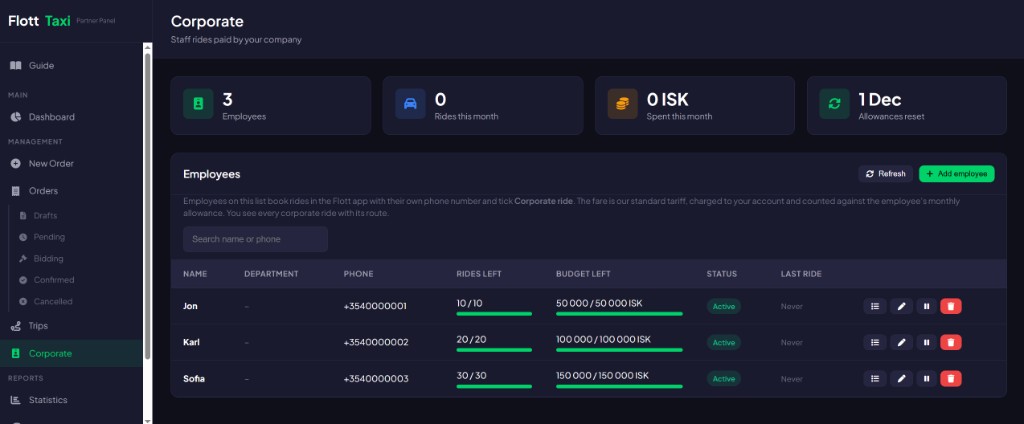
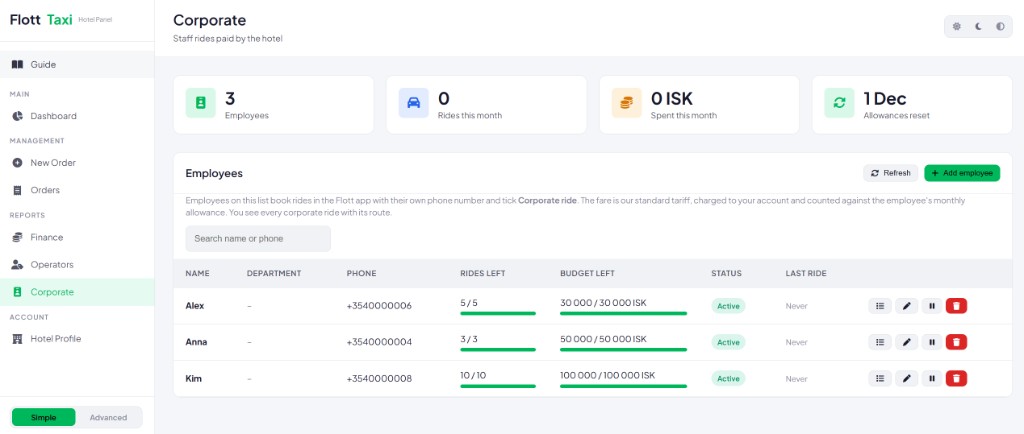
Real screens from the Corporate section of the hotel and partner dashboards. Names and phone numbers are test data.

Corporate section of the Flott hotel dashboard with a list of employees and their monthly limits
Hotel dashboard. At the top: employees, rides and ISK spent this month, and the date the allowances reset. Below: each employee with rides and budget left, status, last ride, and buttons to view trips, edit, pause or remove.
Corporate section of the Flott partner dashboard in dark mode
Partner dashboard for tour operators and other businesses: the same Corporate section, here in dark mode.

For the manager and for the employee

The account owner manages access in the dashboard. The employee books in the app, for themselves.

For the manager

  • Change, turn off, turn back on or remove an employee at any time. Only the owner of the organisation account can do this.
  • For each person you see how many rides and how much ISK is left this month, and the list of their trips: date, route, car class, price and status.
  • Plan against GPS: trips where the actual GPS track diverges sharply from the planned route are highlighted.
  • Staff rides stay separate from guest and client rides. Filter by Guests or Staff, filter by one employee, and see separate totals.
  • Excel and PDF export includes the trip type, the employee’s name and totals per employee.
  • In the order and trip list, staff trips are marked with a badge: Staff · name.

For the employee

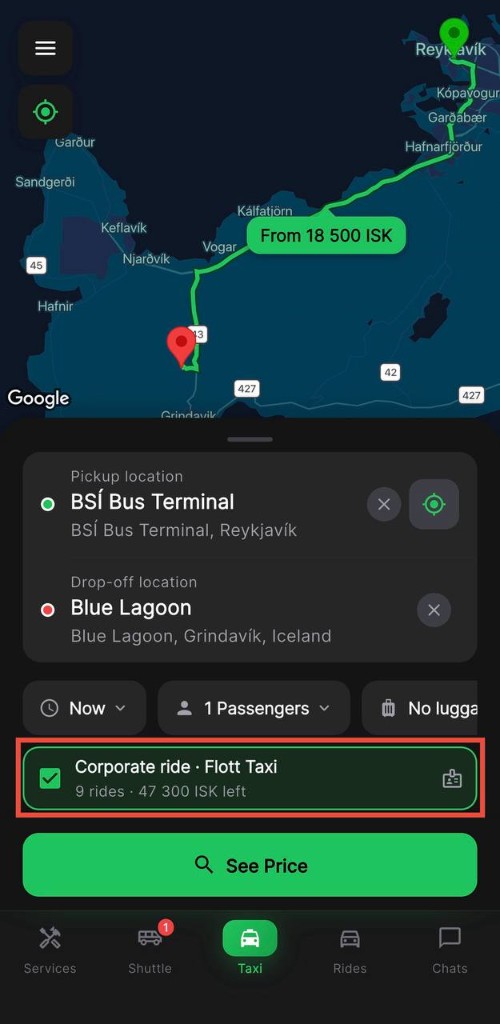
Flott app booking form with the Corporate ride box ticked and the rides and ISK left
In the app: tick Corporate ride and see what is left this month.
  • They install the regular Flott Taxi app — App Store or Google Play — and sign in with the phone number the company added. Nothing else to set up.
  • A Corporate section appears in the menu: the company name, rides and ISK left this month, the date the limit refreshes (the 1st), and this month’s trips with a status of charged, not charged or booked.
  • The booking form shows a checkbox, “Corporate ride · company name”, with the balance, for example “9 rides · 47 300 ISK left”. If the limit is used up or access is turned off, the row is inactive and shows why.
  • With the box ticked, the price is fixed and known before the order. There is no bidding and no waiting for offers from drivers. Car classes that cost more than the remaining budget cannot be selected. The employee pays nothing: the order is marked paid by the company, and the driver does not take any money. The ride can be for now or for a later time. A destination is required. Promo codes cannot be combined with a corporate ride.
  • The driver simply accepts the order. During the trip and in the history the employee sees “Paid by” and the company name.
  • The app tells the employee that the company can see their corporate trips, including the addresses. Both sides see the same record.

Limits, GPS and reports

Limits are monthly. A ride counts in the month it was ordered.

  • The ride allowance and the ISK cap refresh automatically on the 1st of each month.
  • The fare and the ride are reserved when the order is placed. If the ride is cancelled, expires, or the passenger does not show up, the reserve goes back to the limit.
  • If a completed ride is cancelled later — for example after a complaint — it is returned to the employee’s limit as well.
  • The price is the standard Flott fare for passengers, and it is shown before the employee confirms the ride.
  • One phone number can be an employee of only one organisation.
  • Staff rides go into the organisation’s reports and into its settlement with Flott. We agree the terms when we connect you.

Ask us to connect your company

Send a short request and we will reply. There is no self-signup — we open the account, if you need one, and turn Corporate rides on.

We use these details only to reply about connecting your company.

Frequently asked questions

Quick answers to the most common questions

The Corporate ride row in the booking form turns inactive and shows the reason. A corporate ride cannot be placed until the limit refreshes on the 1st, or the company raises it.

The fare and the ride are reserved at the time of booking. A cancellation, an expired order or a no-show returns that reserve to the employee’s limit. A completed ride that is later cancelled, for example after a complaint, is returned as well.

Automatically on the 1st of each month. The ride counts in the month it was ordered. Time is Icelandic, which is the same as UTC.

No. Promo codes cannot be combined with a corporate ride.

No. The employee books it in the Flott app. This page is where the company asks us to connect Corporate rides.

Yes. Each trip is listed with its route, car class, price and status. The app tells the employee that corporate trips, including the addresses, are visible to the company.

No. A corporate ride is for the employee. Trips for guests and clients stay separate in the dashboard.

Staff rides go into the organisation’s reports and into its settlement with Flott. We agree the terms when we connect you.

Pay for staff rides
without the receipts

We open the account and turn Corporate rides on after your request. There is no self-signup on the website.

From our blog

Travel tips, transfer guides and Iceland insights

Read all articles →